
Anyone searching for free OnlyFans pages will quickly notice how many results look identical to real profiles. This guide explains a verification routine that catches most fakes before you follow, message, or spend anything. The method is simple: cross-check a page against its linked social accounts and its own posting history, then watch how it behaves in private messages.

The core problem is structural. OnlyFans has no built-in discovery feed or directory, so readers rely on search engines, ranking sites, and social media to find creators. That gap is exactly where copied profiles and impostors operate. A page that looks convincing at a glance may have no history behind it at all.
Verification takes a few minutes per page once you know the sequence. The sections below follow the same order a careful reader would use: check the free-page problem first, then links, then photo history, then profile details, then messages, then hard stops.
Why free pages attract fakes
A price set to $0 removes the payment barrier that normally filters impostors. Paid pages typically run $4.99 to $15, with averages around $5 to $10, and the platform range reaches $49.99 at the top end. Even the smallest charge forces a card on file, which creates a trail. Free pages skip that step entirely, so anyone can create one in minutes.
Free pages are not scams by default. Many real creators set the subscription to $0 and earn through pay-per-view messages and tips instead. The issue is that the same low entry cost that helps genuine creators also helps people copying their photos and names.
Common fake patterns repeat often enough to recognize on sight:
- A page created recently but claiming years of content history
- No linked social accounts, or links that lead to empty or inactive profiles
- Photos that appear on several pages under different names
- A bio written in generic promotional language with no personal detail
- Immediate pressure in messages to move to another app or payment method
- Follower counts that look inflated relative to engagement
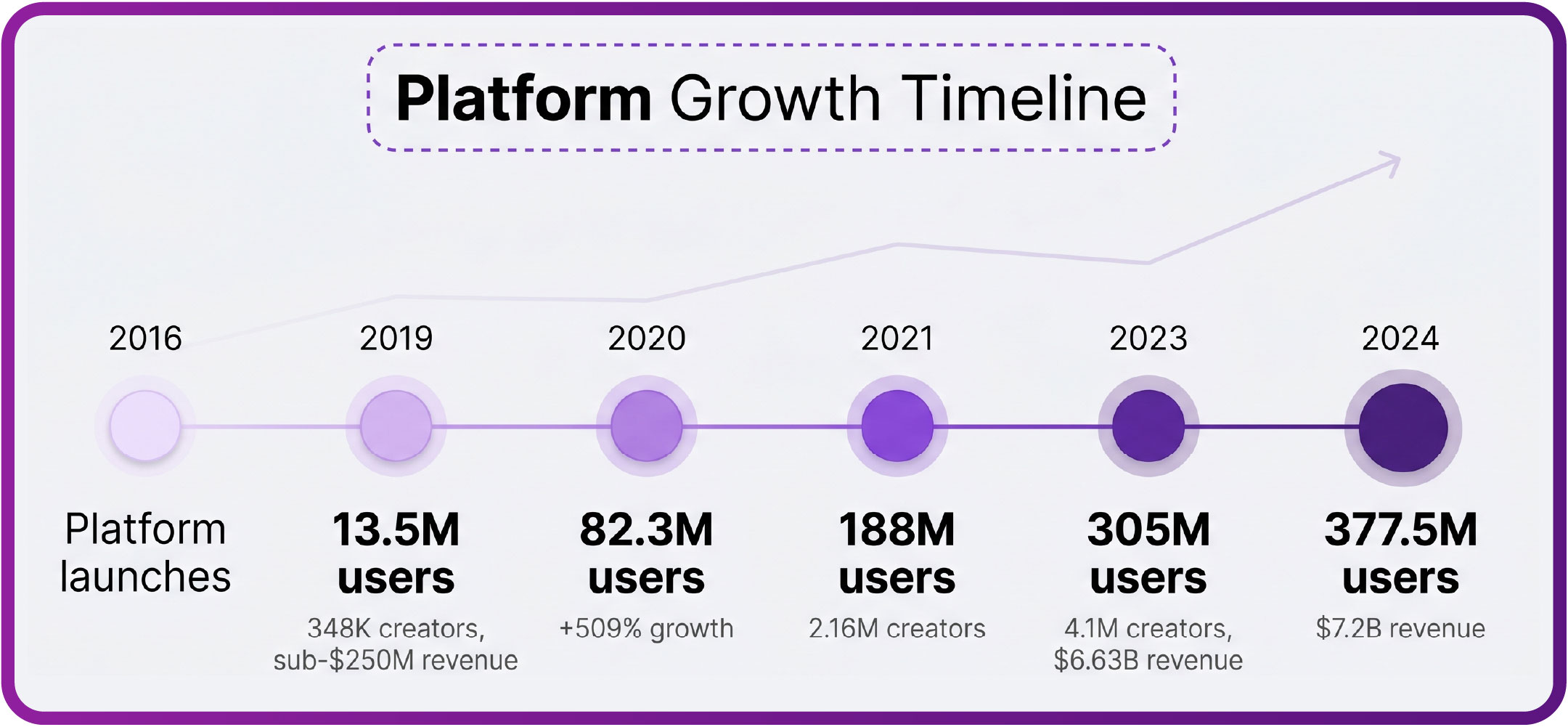
 OnlyFans user growth by year with the 2020 surge highlighted”>
Check the linked social accounts
The linked social accounts are the fastest verification tool available. A genuine creator usually links a profile that existed before the OnlyFans page did. The name, spelling, and posting style should match across every platform.
A practical tip: open each linked account in a new tab and check the join date or earliest posts. If the social profile is younger than the page it is supposedly promoting, treat that as a warning rather than a minor detail.
This table shows the signals to compare and what separates a good sign from a poor one:
| Signal | Good example | Poor example |
| Account age | Social profile active for two or more years | Profile created last month with a handful of posts |
| Name match | Same handle across all platforms | Slight spelling changes between platforms |
| Posting consistency | Regular posts with replies from real users | Long gaps, or only reposts with no interaction |
| Link direction | Social bio links to the OnlyFans page | OnlyFans bio links out but nothing links back |
| Photo match | Same face and setting across platforms | Photos that look sourced from different people |
When every signal on the left column lines up, the page is usually genuine. When two or more fall into the right column, pause before following.

Cross-check the photo history
Photo history exposes most copied profiles. A single reverse image search on two or three posts often reveals the same pictures on unrelated pages. Fakes rarely produce new material, so their grids are recycled from older or stolen content.
Work through these steps in order:
- Pick two or three photos from the page grid and save them.
- Run each through a reverse image search.
- Note every site where the same image appears.
- Compare the dates on those results with the page’s claimed history.
- Check whether the page’s older posts show a consistent setting, lighting, and style.
- Look for sudden changes in photo quality that suggest a batch was added at once.
Consistency over time is the strongest single indicator. A real creator’s grid shows gradual changes in appearance, location, and equipment. A copied grid often jumps between styles because the images come from different sources.

Profile completeness signals
A complete profile takes effort, and effort is hard to fake at scale. Score each page on three areas: bio quality, link consistency, and posting history depth. This table gives a simple way to rank what you find.
| Area | Strong | Weak |
| Bio quality | Specific details, clear description, no copy-paste phrases | Generic sales lines, emojis only, or nothing at all |
| Link consistency | All links work and point to matching accounts | Dead links, redirects, or links to unrelated pages |
| Posting history | Regular posts spread across months or years | All posts uploaded in one day, then silence |
| Message tone | Replies match the public posting voice | Replies read like a template sent to everyone |
No single weak area proves a page is fake. Three weak areas together usually do. Treat the table as a rough score rather than a verdict, and combine it with the link and photo checks above. For a starting point, onlyfans free pages collects free pages.

Message patterns that give fakes away
Messages reveal behaviour that a profile page can hide. Fakes tend to open with a rushed greeting that arrives within minutes of a follow, before any interaction has happened. Real creators usually message in batches, and the timing varies.
Generic copy-paste openers are another sign. The same wording appears across several conversations, and replies do not answer the specific question asked. Off-platform payment requests are the clearest warning of all.
Understanding normal costs helps you judge unusual requests. Paid pages sit between $4.99 and $49.99, with most in the $4.99 to $15 range and averages near $5 to $10. There is no base price below $4.99; only promotional first months may dip lower. Free pages earn through pay-per-view messages and tips, and the platform takes 20% of everything, leaving the creator 80%.
- Subscription: $0 on free pages, or $4.99 to $49.99 on paid pages
- Pay-per-view messages: set by the creator, vary by page
- Tips: optional, chosen by the reader
- Platform fee: 20% on subscriptions, tips, and pay-per-view
- Creator share: 80% after the fee
- Promotional first months: the only route below $4.99
One more detail matters when money is involved. If a creator raises the subscription price, auto-renew stops, and existing access lasts until the current paid period ends. No legitimate page needs a workaround for that process.

Red flags that justify walking away
Some requests have no innocent explanation on a subscription platform. Payment methods outside the site remove every protection you have, including the ability to dispute a charge through the platform.
Warning: requests for gift cards, cryptocurrency, or bank transfers are a hard stop. Legitimate payments run through the platform itself, and no verification step should ever require you to send money elsewhere.
Treat these as reasons to stop immediately:
- Requests for gift cards, crypto, or bank transfers
- Pressure to move the conversation to a private messaging app
- Demands for personal documents or account passwords
- Threats or guilt-based messages when you decline
- Claims that a payment failed when your bank shows it cleared
- Any request to pay a fee to unlock contact with the creator
None of these appear on genuine pages. Walking away costs nothing, and the page will still be there if the signals later change.
Reporting and moving on
Reporting a suspected fake takes a minute and protects other readers. Use the report option on the profile or in the message thread, and include the specific reason, such as copied photos or an off-platform payment request. Screenshots help if the page is later deleted.
Reporting also feeds the ranking sites that readers depend on. Because OnlyFans has no discovery feed or directory, directories and ranking lists do much of the sorting work, and reader reports are part of how bad pages get removed from those lists.
If you are comparing alternatives after a bad experience, this roundup of onlyfans free pages covers how free accounts differ from paid ones. BestOnlyFans style directories exist for the same reason: to replace the missing discovery layer with something readers can filter.
Mistakes to avoid when reporting and moving on:
- Do not confront the account directly; it only warns them to change details
- Do not share the suspect page in public threads without context
- Do not send any payment while a report is pending
- Do not assume one report removes a page; multiple reports carry more weight
- Do not skip the report because someone else probably filed one
Verifying pages you already follow
Pages followed before you knew these steps deserve a quick recheck. Start with the linked social accounts, since they take the least time. Then scan the photo history for images that also appear elsewhere.
A recheck habit works best on a schedule. Every few months, run the same three checks on the pages you actually spend money on. Most will pass without issue, and the ones that fail will be obvious.
BestOnlyFans readers often build a short list of verified pages and revisit it rather than browsing new results constantly. That approach reduces exposure to copied profiles and keeps spending predictable. The verification steps in this article work the same way whether you found a page today or two years ago, which is the point of writing them down. BestOnlyFans refreshes its rankings every month.
FAQ
How can I tell if an OnlyFans page is fake?
Check whether the linked social accounts predate the page, run reverse image searches on a few posts, and compare the message tone with the public posting style.
Are free OnlyFans pages more likely to be fake?
They attract more impostors because a $0 price removes the card check that paid pages require, but free pages are legitimate when they earn through pay-per-view messages and tips.
What should I do if a creator asks for gift cards or crypto?
Stop the conversation and report the account, because legitimate payments run through the platform, which keeps a record and offers dispute options.
Does reporting a fake page actually help?
Yes, reports give ranking sites and directories the evidence they need to remove bad pages, which protects readers who rely on those lists for discovery.